








Regression Testing: The Complete Guide & Best Practices

The word “regression” means to return, which is not necessarily desirable in many aspects of life. However, software regression testing within the system is vital to keep the software stable even with constant modernization. With the fast-paced and digital world around us, users expect nothing but perfection from their experiences. A global survey of over 3,534 smartphone users found that most consumers will abandon an app after just one or two failed attempts, with only a small minority willing to give it more than two tries. (Source: A global mobile app survey, via Econsultancy).
Software updates and improvements are released regularly, and while these updates are intended to add new features to better the user experience, there are times when the new changes interfere with the current features already in place. An unchecked change may cause performance issues, security vulnerabilities, or workflow breaks. Thus, businesses need to embrace regression testing in their development cycle to mitigate risks, ensure reliability, and offer a smooth user experience.
- What is Regression Testing?
- Why Regression Testing Matters and What Skipping It Costs
- Regression Testing vs. Retesting
- Types & Techniques of Regression Testing
- How Regression Testing is Performed
- When to Perform Regression Testing
- Regression Testing Metrics and KPIs
- Common Regression Testing Challenges and How to Solve Them
- Conclusion
- Regression testing re-runs current test cases to confirm that new code doesn’t break what already worked.
- It differs from retesting in that it confirms a specific bug fix; regression testing checks the whole system for unintended side effects.
- Skipping it doesn’t save time; instead, it shifts the cost downstream to production incidents, which are more expensive to fix.
- Teams select between retest-all, selective, and prioritized techniques depending on release size and risk tolerance.
- AI-driven impact analysis is increasingly replacing manual test selection; see our guide to AI for regression testing for that angle in depth.
What is Regression Testing?
Regression testing is a software testing technique that determines whether new code changes have affected existing functionalities. It means executing the test case subset again to ensure bug fixes, new functionality, or changes in existing functionality do not create unintended side effects. It ensures that previous functions are still working to maintain the software’s quality and the system’s integrity.
Regression Testing Example
Say a team updates the password-reset flow to add a “resend code” option. The new feature works fine on its own. But the login module shares a validation library with the password-reset flow, and after the update, users who reset their password can no longer log in with special characters in a new password.
Nothing about the login page changed directly. The missed bug is through a shared dependency. Regression testing catches issues like this by re-running the existing login test cases with the new password-reset tests.
Why Regression Testing Matters and What Skipping It Costs
Incorporating regression testing into the software development life cycle offers several benefits:
- Identifies issues introduced by recent changes before they reach production.
- Maintains the reliability of existing functionalities amidst ongoing development.
- Supports frequent releases by ensuring new changes do not disrupt existing features.
- Delivers a consistent user experience by preventing the recurrence of old bugs.
Regression testing cost doesn’t disappear when testing is skipped; it moves downstream and gets more expensive.
- Production incidents cost more to fix than pre-release defects. A bug caught in regression testing is a config change. The same bug caught in production is a rollback, customer communication, and engineering time pulled off the roadmap.
- A vendor-driven Salesforce or SAP update that breaks a custom workflow doesn’t affect one team; it can halt an approval chain, a billing process, or a compliance-critical step, since these systems sit at the center of business operations.
- The fix is rarely proportional to the miss. A missed edge case in checkout might cost a few failed orders. A missed regression in an approval workflow or a payment integration can mean hours of manual reconciliation after the fact.
None of this means testing everything, every time, is the right answer; that’s the over-testing problem covered later in this guide. The point is that regression testing isn’t a cost center to minimize; it’s where you choose to pay a small, predictable cost now instead of a large, unpredictable one later.
 Also Read: AI-Prioritized Regression Testing
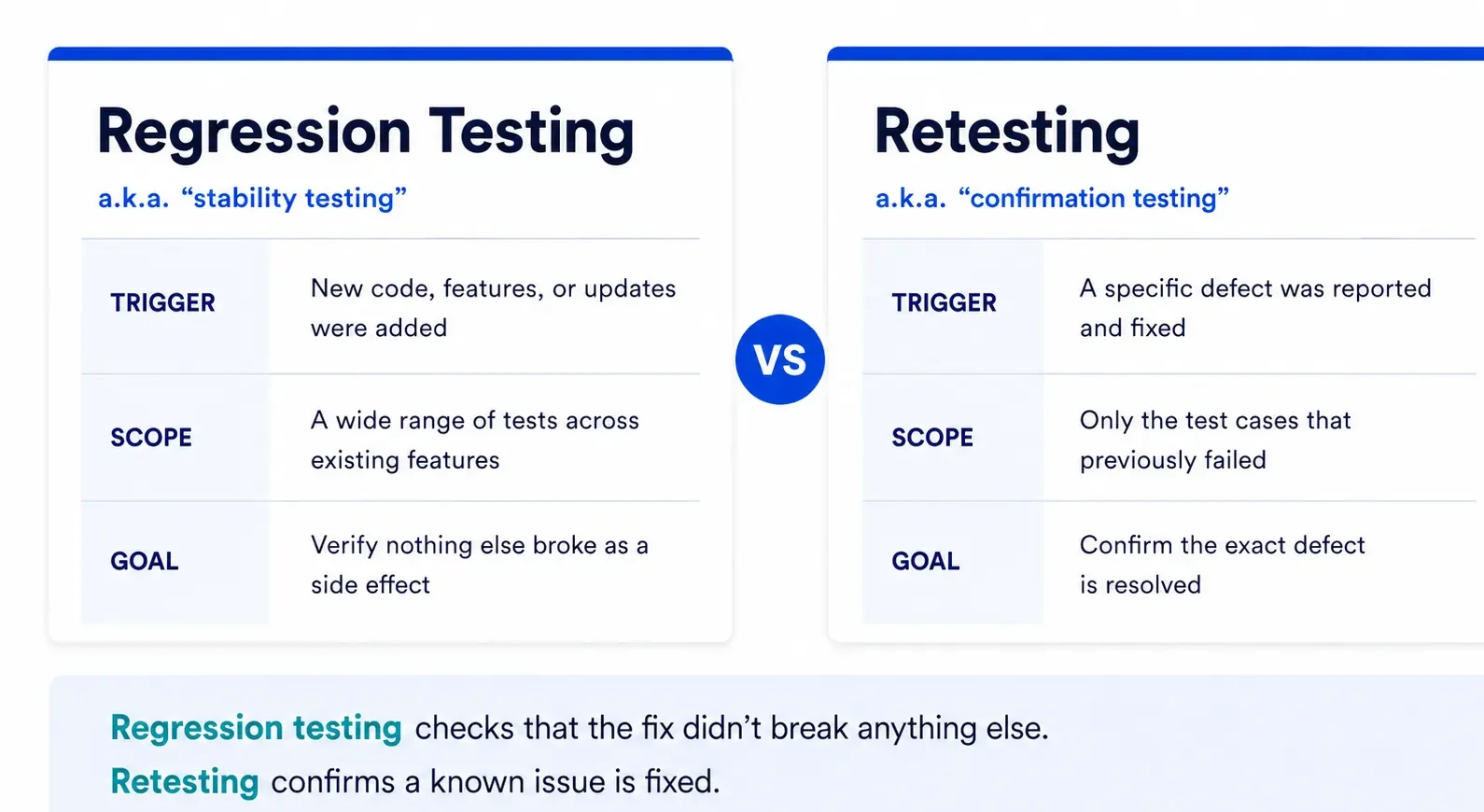
Regression Testing vs. Retesting
Both regression testing and retesting require test execution but focus on different goals:
Types & Techniques of Regression Testing
Types of Regression Testing
| Type | What It Checks | Best Used When |
|---|---|---|
| Unit Regression | Individual modules or components in isolation | After isolated code changes within a single unit |
| Partial Regression | Application subset tied directly to the change | Small-to-medium updating features or bug fixes |
| Full Regression | The entire application, end to end | Major releases, architecture changes, or after several accumulated changes |
Regression Testing Techniques
A type tells you what to test; a technique tells you how to pick those tests and how much of that decision you can hand off to automation versus doing it by hand.
-
Retest All means running every existing test case, just to be safe nothing was quietly broken. It’s thorough, but it eats up time and resources fast not always practical when releases come often.
-
Regression Test Selection narrows things down to a subset of tests tied directly to what actually changed, so effort goes toward the areas that were covered instead of all at once.
-
Test Case Prioritization takes a different angle; it ranks tests by criticality, selectivity, and how often they’re used, so the functionality that matters most gets checked first.
-
Hybrid Approach, which is really just selection and prioritization working together. You will get decent coverage without burning through your whole test suite every time.
How Regression Testing is Performed
The workflow tends to look the same no matter which technique you’re using:
First, identify what changed, whether it is a code fix, a new feature, a config update, whatever it is. From there, assess the impact, such as which modules, integrations, or workflows this could touch. Once you know that, you select or prioritize the relevant tests, pulling from retest-all, selection, or prioritization depending on the situation. Then you actually run them, whether that’s manually, through automation, or a mix of both. After execution, you analyze the results against what was expected and flag anything that looks off. Any failures get logged, fixed, and retested to confirm the fix actually holds.
Then the cycle starts again with the next change, and honestly, this test-selection step (i.e., deciding what really needs to run) is where you can save time, and not in the execution.
When to Perform Regression Testing
To maintain software quality, regression testing should be performed in these scenarios:
- Post Bug Fixes: To ensure corrected issues aren’t repeated, and new problems haven’t been introduced by the fix.
- Post Feature Enhancements: To confirm new functionality doesn’t break existing features and integrates well.
- During Integration: To ensure that combining modules or components doesn’t cause unforeseen behavior.
- Pre-release: To make sure software is stable and reliable before deploying to production.
Regression Testing Metrics and KPIs
If you’re running regression testing, it should catch the right defects and get more efficient over time. These are the core metrics to track.
| Metric | Formula | What It Tells You |
|---|---|---|
| Defect Leakage Ratio | Defects found in production ÷ Total defects (regression + production) | How many bugs regression testing is missing |
| Regression Test Effectiveness | Defects caught by regression tests ÷ Total defects introduced by the change | Whether test selection is actually targeting risk |
| Test Coverage % | Test cases tied to changed components ÷ Total components changed | Whether critical areas are being tested at all |
| Automation Rate | Automated regression tests ÷ Total regression tests | How much of the suite still depends on manual effort |
| Flaky Test Rate | Tests that fail without a real regression ÷ Total tests run | Whether false positives are eroding trust in the suite |
| Regression Cycle Time | Total time from test kickoff to sign-off | Whether testing is keeping pace with release cadence |
Track these before and after any process change, new tooling, a shift to risk-based test selection, and so on over 2–3 release cycles rather than a single release, so you’re comparing against a stable baseline instead of noise.
Common Regression Testing Challenges and How to Solve Them
| Challenge | Best Practice |
|---|---|
| Time and resource constraints: Regression suites can take days to run as they grow | Use risk-based test selection instead of retest-all for every change |
| Test case maintenance overhead: Scripts break with every UI or workflow update | Run regular suite audits; retire outdated or redundant tests |
| No visibility into change impact: Hard to know which areas a change actually touches | Perform impact analysis before selecting which tests to run |
| Automation complexity on dynamic UIs: Brittle scripts fail on minor layout changes | Use self-healing scripts or stable locator strategies |
| Redundant coverage: Different test cases checking the same functionality | Consolidate overlapping test cases during suite reviews |
Conclusion
Regression testing matters because it can confirm that new code hasn’t quietly broken something that used to work. Risk-based test selection, keeping your suite well-maintained, and tracking the right KPIs can cut down on defects, keep steady quality, and let teams ship with more confidence.
With regular software releases, regression testing is necessary. AI is increasingly changing how teams select and prioritize regression tests instead of running the full suite, machine learning can map a code change to the components it actually affects and test those first, shifting regression testing from exhaustive to risk-based.
With built-in codeless automation capabilities, ACCELQ enables testing without the hassle of coding and provides in-depth coverage across web, mobile, API, and enterprise applications driving regression testing alignment, reducing release cycles, and ensuring all-around test coverage.
FAQ's
What is regression testing in software testing?
Regression testing is an essential type of Software testing. It is the process of evaluating already-released software to ensure that no functionality has been broken as a result of any change or modification. Overall stability and functionality of current features are ensured by corrective regression testing.
Can regression testing be automated for machine learning applications?
Sort of. You can automate the deterministic parts - APIs, data pipelines, integration points without much trouble. The model outputs themselves are probabilistic, so there's no "correct" answer to check against. Most teams end up pairing regression tests with model-specific checks, like monitoring performance-metric thresholds rather than trying to match exact outputs.
How does regression testing differ in traditional software testing versus machine learning models?
Traditional regression testing is pretty binary - you compare actual output to expected output, and it either passes or it doesn't. ML flips that on its head. There isn't one "correct" output to check against, so testing shifts toward whether accuracy, precision, or other metrics stay in an acceptable range after an update, rather than looking for an exact match.
Is automated regression testing software worth it over manual testing?
For any suite you're re-running often, yes - automation takes the repetitive execution off your plate and catches regressions faster than a person cycling through the same tests over and over. That said, manual testing still earns its keep for exploratory work and for brand-new scenarios that don't have test cases built yet.



Chaithanya M N
Content Writer
A curious individual who is eager to learn and loves to share her knowledge using simple conversational writing skills. While her calling is technology and reading up on marketing updates, she also finds time to pursue her interests in philosophy, dance and music.


You Might Also Like:
 Guide to GUI Testing for Seamless User Interactions
Guide to GUI Testing for Seamless User Interactions
 What is Unit Testing? Best Practices to Do it Right
What is Unit Testing? Best Practices to Do it Right
 What Is End-to-End Testing? Examples & When to Use It